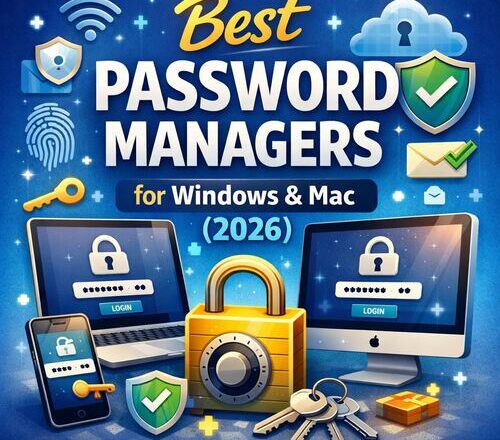
Passwords have become a critical part of our digital lives. From email accounts and banking apps to work tools and cloud platforms, the average user manages dozens of logins every day. This is why choosing the best password managers for Windows & Mac has become essential for both security and convenience. Remembering all of these credentials is not only difficult but also risky, as reusing weak passwords or storing them in browsers and notes can expose you to serious security threats.
This is where password managers come in. A good password manager stores your credentials securely, generates strong passwords, and syncs them across devices. In this guide, we will explore the best password managers for Windows & Mac, focusing on security, usability, and real world performance. Whether you are an individual user, developer, or small business owner, this article will help you choose the right tool.
Why You Need a Password Manager in 2026
Cybersecurity threats are increasing every year. Data breaches, phishing attacks, and credential leaks have become common. Even large companies with strong security practices experience breaches, and once your password is exposed, attackers can try it across multiple services.
Using a secure password manager eliminates many of these risks. Instead of memorizing dozens of passwords, you only need to remember one strong master password. The manager handles the rest, storing your data in encrypted form and autofilling credentials safely when needed.
For users on Windows and Mac, a cross platform password manager ensures that passwords remain accessible and secure regardless of the operating system you are using.
How Password Managers Work
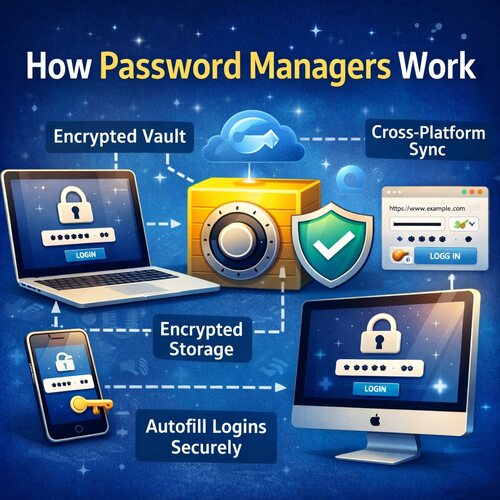
A password manager acts as an encrypted vault. When you save a password, it is encrypted locally on your device before being stored. Most modern password managers use zero knowledge encryption, meaning even the service provider cannot see your data.
When you log into a website or app, the password manager decrypts the stored credential only on your device and fills it automatically. This approach protects you from keyloggers, phishing websites, and insecure storage methods.
Many password manager apps for PC and Mac also include additional features like password health checks, breach monitoring, and secure sharing.
What to Look for in a Password Manager for Windows and Mac
Choosing the right password manager depends on your needs. However, there are some core features you should always consider.
Security should be the top priority. Look for strong encryption standards, preferably AES 256-bit encryption, along with two factor authentication support. Cross platform sync is essential if you use both Windows and Mac systems. Ease of use also matters, especially if you plan to use the tool daily.
For professionals and developers, advanced features like SSH key storage, command line access, and secure notes can be valuable. Small businesses may need team sharing and access controls.
Best Password Managers for Windows & Mac Compared
1Password – One of the Best Password Managers for Windows & Mac
In my current company, I actively use 1Password as the primary password manager, and my experience with it has been very positive. From a security standpoint, it feels reliable and well thought out, especially for handling sensitive credentials across multiple devices. The overall usability is smooth, and it fits naturally into daily workflows without adding friction. This real-world experience is one of the main reasons 1Password appears at the top of this article. I genuinely find it effective and easy to trust for professional use.
1Password is widely regarded as one of the most secure and polished password managers available. It works seamlessly on both Windows and Mac, offering dedicated desktop apps and browser extensions.
What sets 1Password apart is its strong security model combined with ease of use. It supports password generation, secure notes, and encrypted file storage. The interface is clean and intuitive, making it suitable for both beginners and advanced users.
For developers, 1Password offers features like SSH key management and integration with development workflows. For small businesses, team plans allow controlled sharing and access management.
The main drawback is that there is no completely free version. However, the reliability and security justify the cost for most users.
Bitwarden
Bitwarden is a popular choice for users looking for a secure password manager without high costs. It is open source, which adds transparency and trust for security conscious users.
Bitwarden works well on Windows and Mac, with apps and browser extensions available across platforms. The free version is generous and supports unlimited password storage and cross device sync.
Despite being affordable, Bitwarden does not compromise on security. It uses strong encryption and supports two factor authentication. Paid plans add features like encrypted file storage and advanced security reports.
The interface is functional rather than flashy, but it gets the job done effectively.
Dashlane
Dashlane focuses on combining password management with identity protection. It offers a polished experience on both Windows and Mac, along with strong browser integration.
One standout feature of Dashlane is its built in password health dashboard. It analyzes your saved passwords and highlights weak or reused credentials. It also includes dark web monitoring to alert you if your data appears in known breaches.
Dashlane is easy to use and visually appealing. However, it can feel heavy for users who want a lightweight password manager. The free plan has limitations, and full features require a paid subscription.
NordPass
NordPass is developed by the team behind NordVPN and focuses on simplicity and modern security standards. It supports Windows and Mac platforms with clean desktop apps and browser extensions.
NordPass uses advanced encryption algorithms and offers password generation, secure notes, and cross device sync. Its interface is minimal and beginner friendly, making it easy to adopt even for non technical users.
While NordPass does not yet offer as many advanced features as some competitors, it covers all essential needs and continues to improve with regular updates.
LastPass
LastPass was once the most popular password manager, but its reputation has faced challenges in recent years due to security incidents. Despite this, it still remains widely used and functional on Windows and Mac.
LastPass offers a strong feature set, including password generation, autofill, and secure sharing. Its browser based approach makes it convenient for users who rely heavily on web access.
However, recent security concerns have made some users cautious. While improvements have been made, users should carefully evaluate whether LastPass meets their current security expectations.
Best Password Manager for Developers
Developers often require more than basic password storage. Secure handling of API keys, SSH credentials, and environment secrets is critical.
Among all options, 1Password stands out for developers due to its advanced tooling and integrations. Bitwarden is also a strong contender, especially for those who prefer open source solutions and command line access.
Choosing a password manager that aligns with your development workflow can significantly improve both security and productivity.
Best Password Manager for Small Businesses
Small businesses need secure password sharing without compromising control. Features like team vaults, access permissions, and activity logs become important.
1Password and Dashlane both offer business plans designed for teams. They allow administrators to manage access and ensure that sensitive credentials are not exposed unnecessarily.
For budget conscious businesses, Bitwarden provides excellent value with its affordable team plans and strong security fundamentals.
Security Features That Matter Most
Using a password manager becomes even more important when accessing accounts on unsecured networks. If you frequently work from cafes or airports, it is also worth understanding whether public Wi-Fi is safe on Windows 11 before signing into sensitive services.
A secure password manager should offer end to end encryption and zero knowledge architecture. Two factor authentication adds an extra layer of protection and should always be enabled.
Password health monitoring helps identify weak or reused passwords, reducing your exposure to breaches. Secure password sharing ensures that credentials are not sent through insecure channels like email or messaging apps.
For users on Windows and Mac, local device encryption and secure clipboard handling are also important features to consider.
Free vs Paid Password Managers
Free password managers can be a good starting point, especially for individuals with basic needs. However, they often come with limitations such as restricted device sync or fewer security features.
Paid password managers provide better support, advanced security options, and additional tools like breach monitoring. For professionals and businesses, investing in a paid plan is usually worth it.
Password Manager Alternatives and Built In Options
Browsers like Chrome and Safari offer built in password storage, but they lack the advanced security and flexibility of dedicated password managers. They are also more vulnerable if your browser account is compromised.
While password managers protect your credentials, network security also plays a role in keeping accounts safe. Many users combine password managers with VPN services, and understanding the difference between free and paid VPNs can help you avoid unnecessary risks.
Dedicated password manager apps for PC and Mac provide a much higher level of protection and control. For users serious about security, relying solely on browser storage is not recommended.
Final Verdict on the Best Password Managers for Windows & Mac
Password managers are not just about security anymore. They also improve productivity by eliminating password resets and login delays. If you are building a secure and efficient setup, you may also want to explore some of the best free Windows software for productivity.
Choosing the best password managers for Windows & Mac depends on your priorities. If you want premium security and advanced features, 1Password is an excellent choice. For users seeking affordability and transparency, Bitwarden stands out. Dashlane and NordPass offer strong alternatives with unique strengths.
No matter which option you choose, using a secure password manager is far better than reusing passwords or storing them insecurely. In 2026, protecting your digital identity is not optional. It is essential.
Frequently Asked Questions
Q1. Are password managers safe to use?
Yes, reputable password managers use strong encryption and zero knowledge architecture. When configured properly with a strong master password and two factor authentication, they are one of the safest ways to manage credentials.
Q2. Which password manager is best for Windows users?
Most leading password managers support Windows well. 1Password, Bitwarden, and Dashlane are all strong options depending on your budget and feature needs.
Q3. Do password managers work on Mac and Windows together?
Yes, most modern password managers are cross platform and sync data securely between Windows and Mac devices.
Q4. Is a free password manager enough?
Free password managers can work for basic use, but paid versions offer better security, support, and advanced features that are worth considering.

Ankit is the tech blogger behind MyTechMarvel.com, sharing practical guides and honest software reviews since 2014. He focuses on Windows and PC tools, mobile apps, account security, and everyday tech solutions to help readers make informed decisions.